
Autofill from a document
Autofill reads a file you are about to attach and suggests field values. It does not create the contract. You check the suggestions and choose Create contract yourself.
Two switches have to be on. The workspace switch is AI autofill. The type switch is Autofill from document on that contract type. If the workspace switch is off, the type switch is disabled and says “Turned off in Settings → AI autofill”.
Autofill from a document. Captions are on the picture. There is no voiceover and no music.
Transcript: AI autofill stores a provider, a model, and a key, then turns the workspace switch on. Test connection checks the provider. It does not read a contract. With autofill on, choosing a file suggests fields. Nothing is saved until Create contract. The form fills from the file and marks suggestions. Check them before you save.
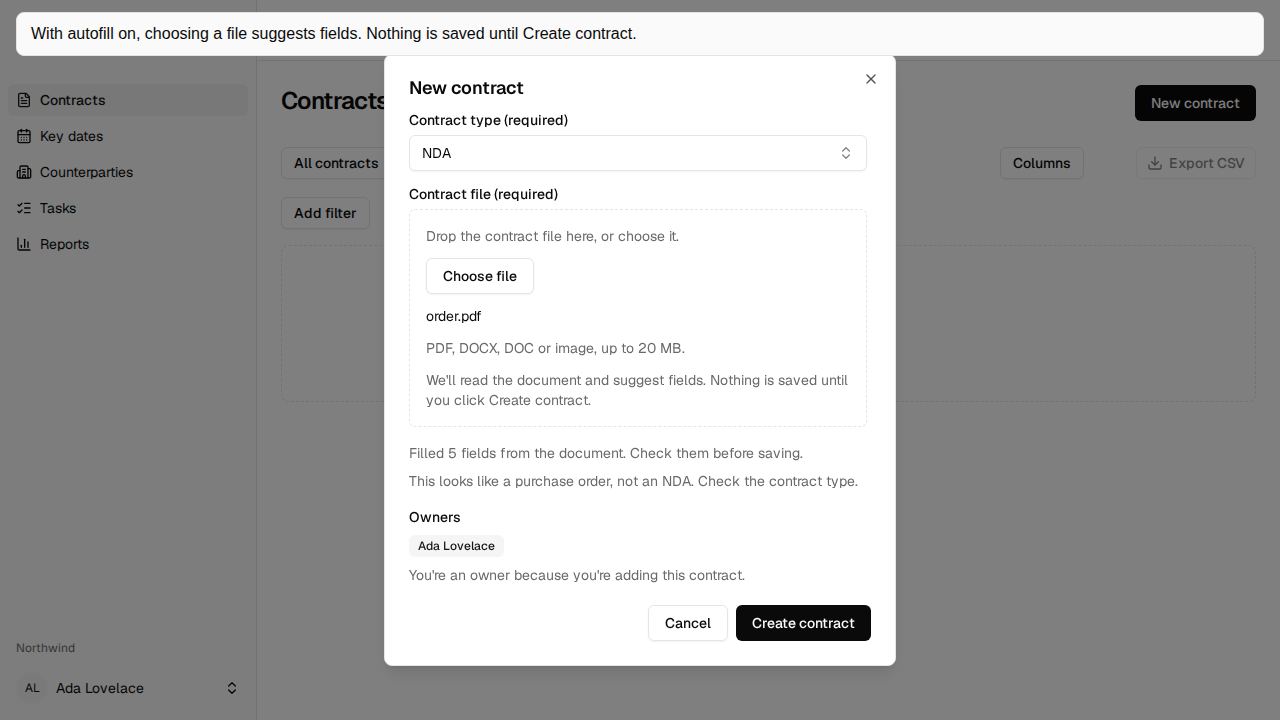
What you see in New contract
Section titled “What you see in New contract”When both are on, the file control says “PDF, DOCX, DOC or image, up to 20 MB.” and “We’ll read the document and suggest fields. Nothing is saved until you click Create contract.” Choosing a supported file shows “Filling in details from the document…”. Skip stops the suggestion and leaves the fields as they are. Closing the dialog does the same.
Fields you have not edited can be filled and marked Suggested. No fixed end date gets that marker beside the checkbox. An empty or disabled field does not. A line says how many were filled. Create contract does not wait for the suggestion.
A scanned PDF is read with the same OCR search uses, so check the suggestions against the pages. A party name split across a line is joined when the page shows it as one name.
How a few fields are guessed
Section titled “How a few fields are guessed”Our entity uses a known spelling only when the document’s party is that same legal entity, ignoring case and punctuation, such as Ltd and Limited. A different name, including a new subsidiary, is kept as written. It is not also added as a counterparty.
No fixed end date is suggested only when the document says the agreement continues indefinitely or until terminated. Auto-renews is suggested from the renewal wording on its own. A notice written in weeks is shown in days. A notice written in years is shown in months.
If the file does not look like the type you chose, a line says so, for example “This looks like a purchase order, not an NDA. Check the contract type.” The type stays the one you chose.
If reading fails
Section titled “If reading fails”- “Couldn’t read details from this document. Fill them in as usual.” means the file could not be read.
- “An admin must enter the AI API key again in Settings. Fill them in as usual.” means the stored key cannot be opened.
- “This file is over 20 MB, so we can’t fill in details from it. Fill them in as usual.” means the file is past the reading limit. It can still be saved when it is within the document limit.
What leaves the workspace is capped: at most 60,000 characters of document text, the field labels, the option lists, the contract type name, and up to 20 known Our entity names from contracts you can open, plus the workspace name when it is not already one of them. Crimple stores the suggestions for 15 minutes and an audit line. It does not store the document text. The key is sealed. You are responsible for the provider’s terms.
An admin sets the provider on AI autofill. There is no production environment variable for the key.