
Columns
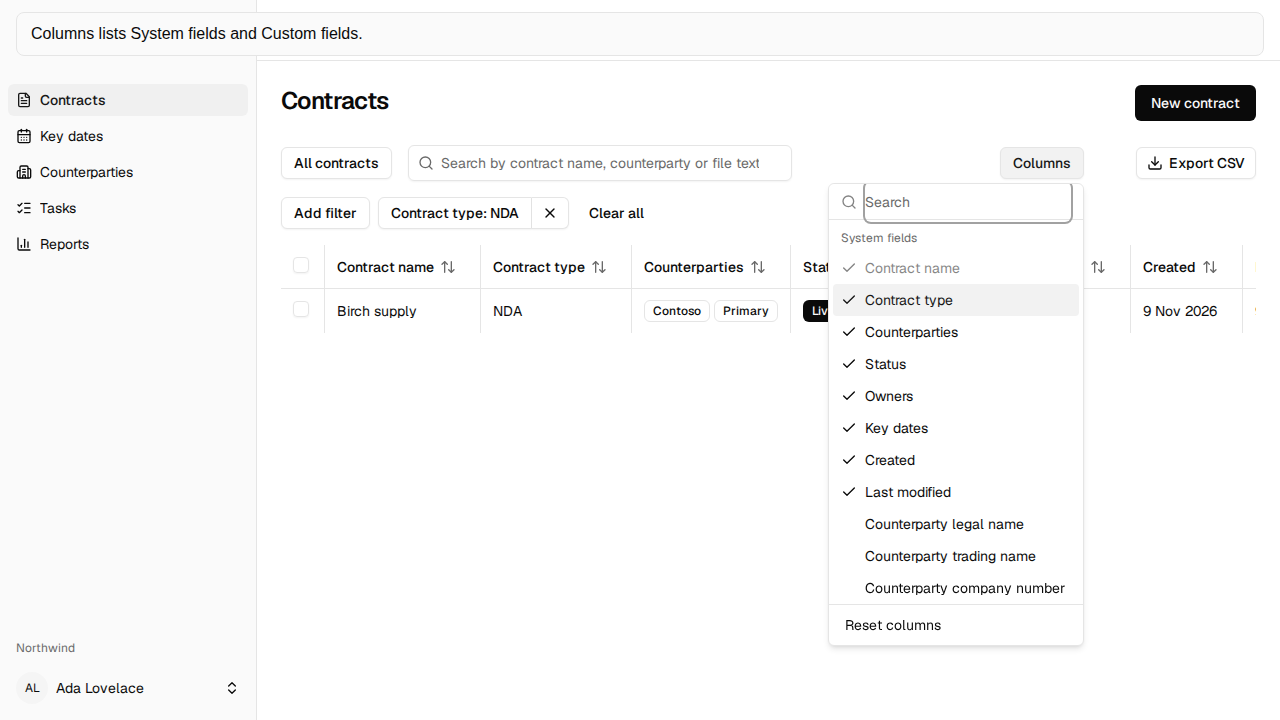
Columns opens the column picker. It stays disabled while the grid is loading and becomes enabled once the grid is ready, so the toolbar does not change width when the rows arrive.
The picker
Section titled “The picker”Built-in columns are grouped under System fields. Workspace fields are grouped under Custom fields. Search columns is at the top and narrows both groups as you type. A group with no matches is hidden. When nothing matches, the menu says “No matches.”
Contract name stays on and cannot be turned off. Reset columns sits at the bottom, outside the list, so the filter cannot hide it. It puts the default columns back.
Arrow down and arrow up move the highlight and leave the cursor in Search columns. Enter turns the highlighted choice on or off. Escape clears the search when it has text, and closes the menu when it is empty.
What else you can show
Section titled “What else you can show”System fields also lists the counterparty legal name, trading name, company number, address, website, and email. Those columns show the effective value. The country column shows the country name. Export CSV writes the country code, and adds a “{column} overridden” column with Yes or No.
A custom-field column shows that field’s text. A custom date shows as 21 Oct 2026. Dates and numbers use tabular numerals. The heading row stays visible while the grid scrolls inside its own frame.
Column choices are saved for you in this workspace. They are not saved for anyone else. A failed save says “Your column choices couldn’t be saved.”